
Dancing Cats: Duet Meow
Sensor Notes GlobalMusic
4.3189.00 Reviews
- Version
- 9.2
- Installs
- 5.00M
- Age Rating
- Everyone
Screenshots
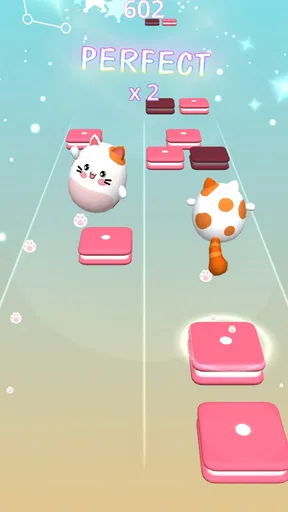
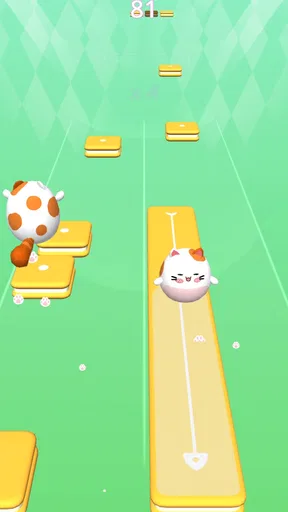
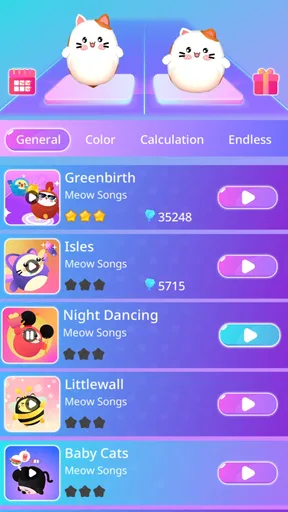
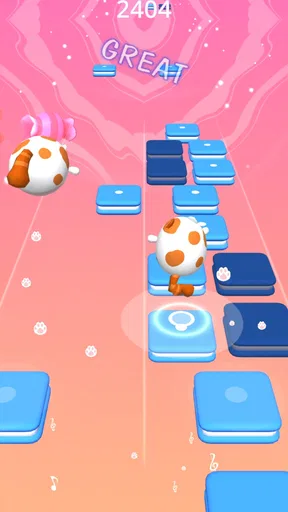
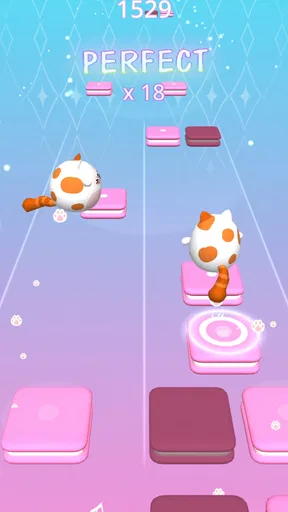
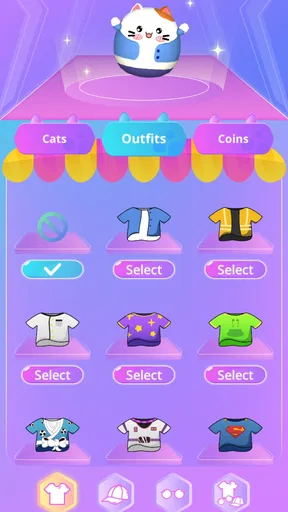
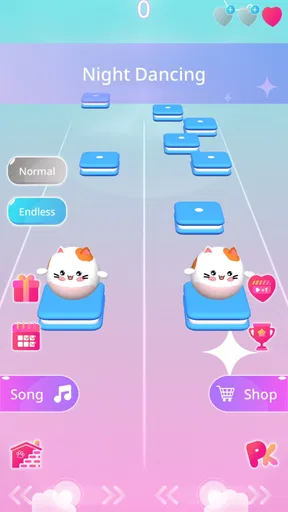
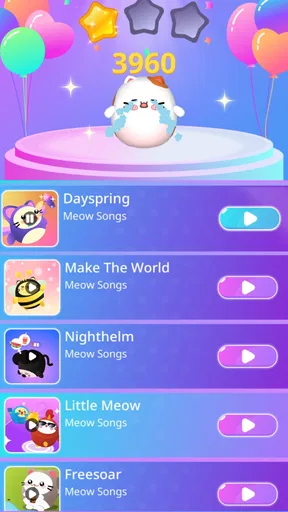
Our Review of Dancing Cats: Duet Meow
 Analysis by Appyee
I approached Dancing Cats: Duet Meow expecting a light music game, and that is exactly where it works best: as a quick, cheerful rhythm break rather than a deep musical training tool. Its central idea is simple and immediately readable. You follow the beat, react to the cats on screen, and try to stay in time while the electronic soundtrack keeps the session moving. The presentation is playful enough for younger players, but the timing challenge gives adults a reason to return for a few rounds too.
This is a free music game from Sensor Notes Global, available for devices running Android 7.0 or later. It is aimed at Everyone, so it is easy to recommend for family use, although younger children may still need help with device settings and optional purchases. The game has been available since November 14, 2018, and its current version is 9.2. That long presence matters: it feels like an established casual title rather than a brand-new experiment.
Its audience is also fairly clear from the store’s average of 4.3 from around 73 thousand ratings and more than 5 million installs. Those figures do not make it automatically perfect, but they do suggest that the basic formula has broad appeal. I found the strongest reason to try it is convenience. You can open it for a short session, understand the objective quickly, and decide for yourself whether the cat-themed style makes the repetition enjoyable.
Where players usually get stuck
I find that players usually get stuck when they mistake an unfamiliar rhythm for a faulty response. This section looks at how to tell timing trouble from a genuine pause, so the next heading can focus on simple checks before a session begins.
The first challenge is timing, not understanding
The game is easy to recognize, but rhythm games can still feel awkward during the first few attempts. The likely stumbling block is not learning a complicated rule set; it is adjusting your eyes and fingers to the pace of each track. New players often react to the animation instead of anticipating the beat. That creates a frustrating pattern: a missed action makes you look more closely at the screen, which can cause the next beat to be missed as well.
I had better results when I treated the music as the primary guide and the animation as confirmation. Before trying to chase a high score, I focused on identifying the repeating pulse. This small change makes the game feel less like a test of reflexes and more like a conversation with the soundtrack. It is especially useful for children, who may initially tap whenever something visually exciting happens.
Short sessions are part of the appeal
One common mistake is expecting the depth of a dedicated rhythm-game series. Dancing Cats: Duet Meow is better suited to casual play, quick retries, and relaxed experimentation. If you want a large competitive system, detailed musical analysis, or a serious practice environment, this will probably feel limited. The cat presentation and accessible structure are the attraction, not a substitute for a full instrument-learning app or a demanding arcade rhythm title.
That distinction also helps explain why I would recommend it to someone who wants a five-minute distraction but not necessarily to a player searching for a long-term mastery challenge. A commuter waiting for a ride, a child taking a short break, or someone looking for a colorful way to unwind can get more from it than a player who wants extensive control over song selection, difficulty, or performance statistics.
Sound and attention can affect the experience
Because the game depends on rhythm, playing in a noisy room can make it harder to judge timing. I would not use it as a background activity while watching television or talking with someone. Headphones can make the beat easier to follow, but I would keep the volume comfortable, particularly when a child is playing. If the game appears to respond poorly, first check whether the sound is being masked by other activity before assuming there is a technical fault.
Another practical issue is attention. A player who keeps looking away from the screen will naturally perform worse, even if the device is working correctly. The bright visual style invites multitasking because it looks like a harmless cartoon, but the rhythm still asks for concentration. A quiet corner and a short uninterrupted session are usually a better setup than trying to play while doing something else.
Setup checks that prevent avoidable frustration
Before changing settings or reinstalling, I like to make the first attempt a controlled test: keep the device steady, listen in a quiet spot, and notice whether the same issue happens twice. The checks below help narrow down the cause without turning a quick game into a long troubleshooting task.
Start with the device basics
Since the game supports Android 7.0 and newer, the first check is compatibility. If you are helping someone install it on an older phone or tablet, confirm the operating system before spending time troubleshooting. On a compatible device, I would close demanding apps in the background, make sure there is enough storage for the installation, and restart the device if the store or game behaves unusually. These are ordinary steps, but they remove several problems that can look like a game-specific failure.
I would also install it through the normal app store route and allow the installation to finish before opening it repeatedly. Tapping the icon while an update or installation is still incomplete can create confusing behavior, especially on an older device. If the game opens normally but feels slow, reducing the number of other active apps is a sensible first move before blaming the rhythm timing.
Prepare for a free game with optional spending
The game is free to start, with in-app purchases ranging from $0.49 to $3.49 per item. That makes it accessible, but I would still set expectations before handing a phone to a child. A free download does not mean every optional element is automatically free. On a shared device, I prefer enabling purchase controls through the device’s family or account settings and explaining that tapping a tempting item is not the same as earning it through play.
This is also relevant for adults who simply want a no-cost casual game. You can try the core experience without treating the purchase system as part of the challenge. If optional items begin to distract from the music, I would stop browsing them and return to the basic play loop. The game is most enjoyable when spending remains a choice rather than becoming the reason to continue a session.
Make the first test deliberately simple
My recommended setup is a short test session with the device held steadily, the screen clean, and the sound at a comfortable level. I would avoid judging the game from the first few seconds after installation. Give yourself enough time to learn the timing, then try another round with the same posture and listening conditions. Consistency helps you tell the difference between unfamiliar controls and a real performance problem.
For a child, I would sit nearby for the first session and watch what is actually causing difficulty. If the child understands the objective but misses taps, the issue is probably timing practice. If the child cannot see what to do, the problem may be screen size, glare, or the pace of the sequence. That observation is more useful than immediately reinstalling the game.
Older hardware deserves realistic expectations
The minimum operating-system requirement does not guarantee identical performance on every compatible phone. A device may technically qualify while still having a tired battery, limited free storage, or many background processes. If animations stutter, the phone becomes hot, or touch input feels delayed across other apps too, I would investigate the device rather than assuming the cats are responsible.
On a newer device, the game is more likely to feel like the quick casual experience it intends to be. On older hardware, I would keep sessions shorter and avoid playing while the phone is already under heavy load. This is not a reason to reject the game outright, but it is a reason to compare the experience with the device’s general behavior.
Recovering a session when something goes wrong
When a round goes wrong, a calm retry is more useful than making several changes at once. Here I focus on isolating one possible cause at a time, so the following section can distinguish game trouble from issues elsewhere in the device setup.
Separate a missed beat from a frozen game
Rhythm games make ordinary mistakes feel technical. A missed note can seem like delayed touch response, especially when the player is concentrating on the cats rather than the finger position. I use a simple test: play one round with deliberate, slightly earlier reactions and then compare it with the previous attempt. If the result changes consistently, the main issue may be timing rather than freezing.
If the whole interface stops reacting, I would leave the game, wait briefly, and reopen it. When that does not help, a device restart is a reasonable next step. I would avoid repeatedly tapping the screen during a pause, because rapid inputs can make it harder to tell whether the game has recovered or is still processing the previous action.
Use a controlled retry routine
When a session goes badly, I recommend changing only one thing at a time. First replay with fewer apps open. Then test the sound in a quieter place. After that, try a fresh launch. If the problem disappears after one change, you have a useful clue. Changing the network, device settings, volume, and installation all at once may produce a temporary improvement but leaves you unsure what actually solved it.
This routine is particularly helpful for parents. Children often describe every problem as “the game is broken,” even when the real issue is that the phone was being held at an angle or the music was hard to hear. A calm, repeatable check turns the situation into a small lesson in troubleshooting without making the game feel like homework.
Know when reinstalling is excessive
Reinstalling should not be the first response to a single poor round. It removes the app’s local installation and may not address sound, touch, storage, or device-load problems. I would reserve it for repeated launch failures or behavior that remains abnormal after closing the game and restarting the device. Before doing anything destructive, I would consider whether a player has progress or preferences they care about, because reinstalling can affect locally stored information.
If the game opens, responds to touch, and plays music but the player is simply struggling, reinstalling will not improve rhythm. In that case, a slower approach is better: listen first, watch the pattern, and use several short attempts instead of one long, frustrated session.
Purchases need a separate recovery mindset
If an optional purchase does not appear immediately, I would not tap the buy control repeatedly. Check whether the account or store transaction has finished, then close and reopen the game if necessary. Keep any receipt or transaction information available when seeking help through the relevant store or developer channel. The important point is to treat a payment issue differently from a gameplay issue; reinstalling or changing random settings is unlikely to be the right first move.
For families, purchase protection is more valuable before a problem occurs. Setting boundaries on the device and explaining them clearly prevents a child from turning a casual music session into an accidental spending incident. Since the game is free to download, this preparation takes little effort and makes the trial more comfortable.
When the app is not the cause
I do not assume every missed tap or awkward session comes from the game itself; the screen, audio route, and surrounding activity can all affect rhythm play. The next section considers those outside factors and helps decide when another kind of music game would be a better fit.
Touchscreen condition matters more than it seems
A dirty screen, thick protective film, damp fingers, or a loose grip can all affect quick taps. If other games or keyboard keys also feel unreliable, I would clean the display and test the device outside Dancing Cats: Duet Meow. Rhythm play exposes small touch problems because the window for a successful action is brief. What feels like inconsistent game design may actually be inconsistent contact with the screen.
The same applies to accessibility and display settings. Enlarged interface elements, unusual touch-response settings, or system overlays can change how a player sees and reaches the action area. I would not alter advanced settings casually, but I would check whether a recently changed device option coincided with the problem.
Audio routing can change the perceived timing
Bluetooth headphones, wireless speakers, and other audio routes can introduce a delay between what you hear and what you see. If the game feels easier with the device speaker than with a connected accessory, the accessory is an important clue. Try the simplest audio setup first, then compare again. This does not prove that the game is malfunctioning; it shows that rhythm depends on the complete audio chain, not only the application.
Silence can also mislead players. Someone may continue tapping from visual cues while the soundtrack is muted, then conclude that the controls are inaccurate. Before judging performance, confirm that the game’s audio is audible and that the device is not in a mode that suppresses media sound.
Network and store problems are not the same as gameplay problems
If the game cannot be installed or updated, the store connection, account, or device storage may be involved. If it installs but a round plays normally, that is a different category of issue. I would troubleshoot the installation path separately from the rhythm experience instead of treating every error as one large failure.
This distinction helps when deciding whether to keep trying. A player who only experiences an installation problem on one device may have better luck on another compatible device. A player who dislikes the core timing after several fair attempts probably needs a different game, not a repair session.
Choose an alternative based on the real need
Compared with a music-learning app, this game is more playful and less educational. It can encourage attention to beat and reaction, but I would not choose it for reading notation, practicing an instrument, or building structured musical skills. A dedicated rhythm title may be better for someone who wants tougher patterns, deeper progression, or more serious performance goals.
On the other hand, many alternatives are less welcoming to children or less suitable for a quick shared session. The cat theme, Everyone age rating, and free entry point make this a gentler choice for family entertainment. The trade-off is that its charm may wear thin for players who need constant novelty or precise competitive feedback.
My practical verdict after using it
I see Dancing Cats: Duet Meow as a friendly gateway into rhythm games. Its strongest quality is how quickly it communicates its mood: colorful cats, electronic music, and simple beat-focused interaction. I can imagine opening it during a short break, letting a child try it while I sit nearby, or using it as a low-pressure way to see whether someone enjoys timing-based games.
The most useful way to approach it is to remove friction before judging it. Use a compatible device, test the sound, keep the screen responsive, and begin with short sessions. If a round feels unfair, check audio delay and touch behavior before assuming the game has failed. Those steps do not turn it into a deeper title, but they do give the basic experience a fair chance.
I would skip it if your priority is advanced rhythm-game competition, instrument instruction, or a large amount of control over musical practice. I would also be cautious about installing it for a child without first managing optional purchases. The free price is convenient, but family settings still matter when a game offers items from $0.49 to $3.49.
For the right player, though, the limitations are reasonable. This is not trying to replace a music course or a demanding arcade specialist. It is a compact, accessible game for following a beat with an amusing visual theme. My recommendation is to treat it as a short-session music toy with real rhythm appeal, not as a complete musical training experience. That expectation matches what it does well and makes the occasional setup or timing frustration much easier to manage.
With its free entry, Everyone rating, support for Android 7.0 and later, and current version 9.2, it is easy to try on a suitable device. Sensor Notes Global has built something that works best when you want immediate entertainment rather than a long preparation phase. If that sounds like the kind of music game you would share with a friend or family member, it is worth giving the cats a few focused rounds before deciding whether their particular beat is for you.
Verdict
Strengths of Dancing Cats: Duet Meow
- Simple rhythm gameplay is easy for beginners to understand.
- Cute cat animations make each performance visually entertaining.
- Short songs fit well into quick gaming sessions.
- Duet format adds variety compared with standard rhythm games.
- Progression encourages players to replay songs and improve timing.
Limitations of Dancing Cats: Duet Meow
- Later levels can become difficult without precise taps.
- Repeated songs may feel less engaging after extended play.
- Some content may require watching ads or making purchases.
- Fast visual effects could be uncomfortable for sensitive players.
- Gameplay may offer limited depth for experienced rhythm fans.
Similar Picks in This Category
View All
Tiles Hop Music & Ball Game
AMANOTES PTE. LTD.4.3

Magic Tiles 3™ - Piano Game
AMANOTES PTE. LTD.4.6

Real Piano
Bilkon3.7

Piano Game: Classic Music Song
Dream Tiles Piano Game Studio4.0

Smash Colors: Music Ball Rush
BADSNOWBALL HONGKONG LIMITED4.2

Piano Music Go-EDM Piano Games
Joy Journey Music Games4.5
Frequently Asked Questions
What is Dancing Cats: Duet Meow?
Dancing Cats: Duet Meow is a rhythm-based music game in which players guide dancing cats through colorful stages while matching the beat of popular songs. The main challenge is to tap, swipe, or react at the right moment as the cats move along the track. Its simple controls make it approachable, while faster songs and more complex patterns provide a greater challenge for experienced players.
How do you play Dancing Cats: Duet Meow?
Gameplay is based on timing and concentration. As the music plays, you follow the cats’ movement and interact with the screen when notes, obstacles, or rhythm prompts appear. Accurate actions help you maintain your progress and achieve higher scores, while missed beats can interrupt the performance. The game is easy to understand after a short tutorial, although mastering difficult songs requires practice.
Is Dancing Cats: Duet Meow free to download and play?
Dancing Cats: Duet Meow can generally be downloaded without an upfront purchase, but the free version may include advertisements, optional purchases, or content that becomes available gradually. Some items, songs, costumes, or bonuses may require in-game currency or real money. Before downloading, it is worth checking the current store listing and reviewing the purchase settings, especially if children will use the device.
Does Dancing Cats: Duet Meow require an internet connection?
An internet connection may be needed for the initial download, advertisements, updates, account features, or access to certain music and events. Some previously downloaded content may work offline, but the available offline functionality can vary depending on the version and device. If you plan to play while traveling, test the game without Wi-Fi or mobile data first so you know which features remain accessible.
Is Dancing Cats: Duet Meow suitable for children?
The game’s cute cat characters, bright presentation, and straightforward rhythm mechanics make it appealing to younger players. However, parents should still review the age rating, advertising, privacy information, and optional in-app purchases before installation. Music and gameplay are generally lighthearted, but online features or external links may be present depending on the version. Parental controls are recommended for supervised play.
Play our best games!


